Decisions and the Action Box
Some work is too important for an employee to just do: spending money, changing a contract, contacting a key customer. CruzClaw records these moments as decisions, puts them in front of you, and waits. When you approve, the employee who proposed the decision is woken to carry it out. If you write action text with the approval, the Action Box routes that action to the right employee and the right connected tool before the decision is stamped approved.
What a decision is
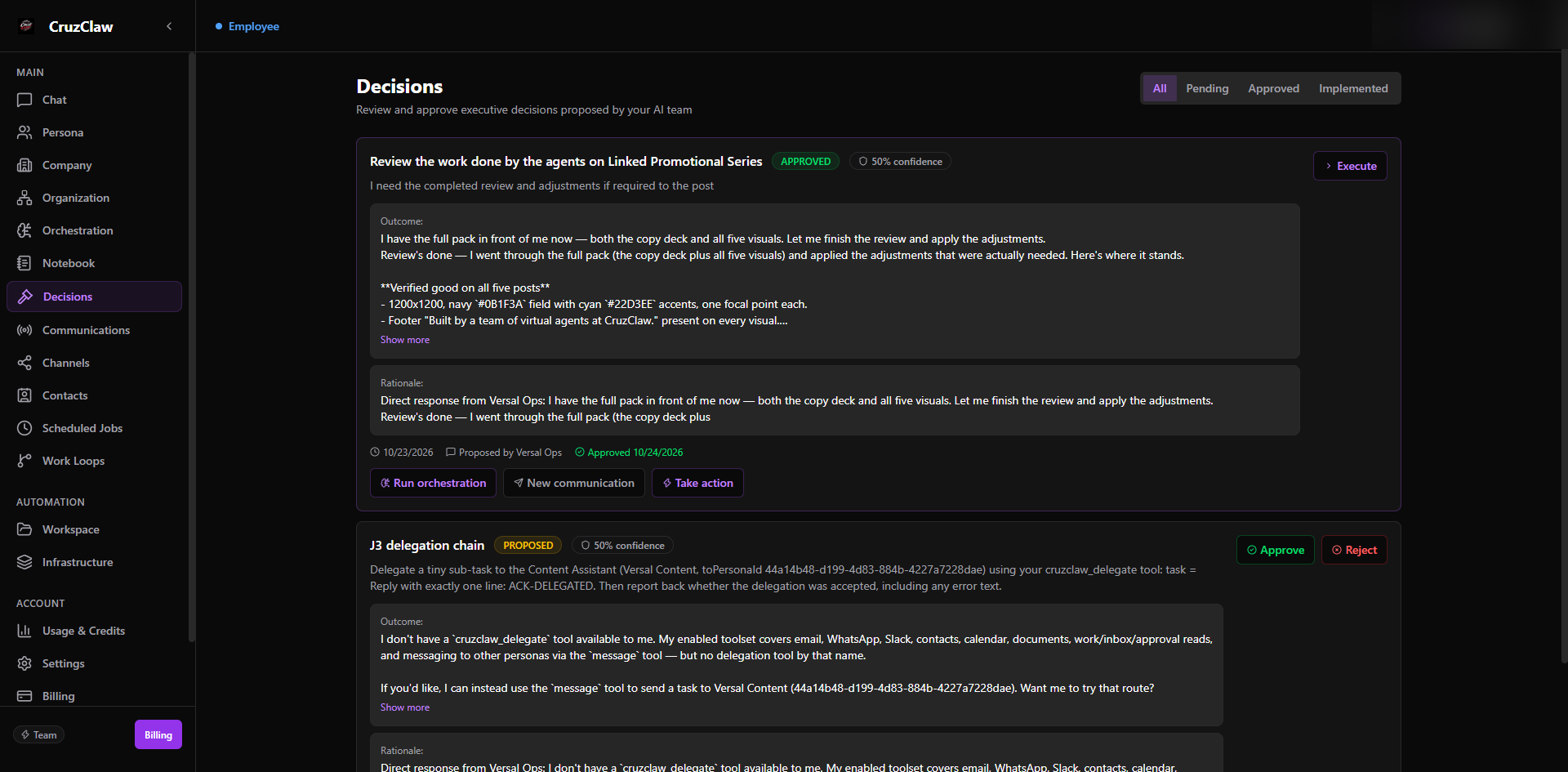
Section titled “What a decision is”A decision is a durable record created when employees debate or plan something that needs your sign-off: for example, when an employee proposes a decision directly and asks for your approval. Each decision has:
- Topic and question: the headline and the specific ask put to you.
- Context: background the employees gathered.
- Decision text and rationale: what was concluded and why, plus a confidence score from 0.0 to 1.0.
- Participants: the employees who contributed, with their input and weight.
- Status:
PROPOSED(orREVIEWING) while waiting for you, thenAPPROVEDorREJECTED, with who decided and when recorded on the row. - Outcome tracking: the expected outcome is recorded up front and can be compared against the actual outcome later, so the system can learn how good its recommendations were.
You meet decisions in the dashboard’s Decisions area, and you can act on them from there, from Slack, or from the dashboard chat. See Slash commands for the chat surface (/decisions, /approve, /reject).
Approving and rejecting
Section titled “Approving and rejecting”Approval and rejection are the same operations the dashboard buttons run:
- Approve flips the status to
APPROVEDand stamps your id and the time. If the decision was proposed by an employee, that employee is woken with a task: “The owner approved your proposed decision: <topic>. Carry out the approved decision now using your tools and judgment.” The decision’s question and context are included so the employee has everything in hand. If the decision’s linked task already ran to completion or failure, approval simply records your sign-off on the outcome; nothing is re-executed. - Reject flips the status to
REJECTEDand appends your reason to the decision’s rationale, so the record shows not just that you declined but why.
From chat, /reject requires a reason; from anywhere, rejecting without one is not possible.
What the Action Box does
Section titled “What the Action Box does”On a decision card (or in /approve <n> … / /do … action text) you write free text and tag the people and tools involved:
@Maya please send the revised proposal to Acme #gmailRouting runs at submission time, mechanically, never through a model. The pipeline is Intent → Route → Execute → Record:
- Parse.
@namementions are matched against your active employees by name or slug (case-insensitive, longest unique phrase wins). An ambiguous name stops the command and lists the candidates; an unknown name stops it with an error.#labeltags are mapped to a required capability through the connection registry: for example#gmailand#google-calendarboth map to the Google Workspace capability,#emailand#superhumanto email sending,#zohoto CRM. A tag that is not in the registry stops the command: nothing is routed. At least one employee mention is required. - Check coverage. An employee holds a capability when a connected channel of that type is bound to that employee. Each mentioned employee is checked against every required capability and marked
coveredormissing(with the missing capability named). - Execute: one durable owner task. The task goes to a single executor: the first covered mention, or the first mention if none is covered. Every mentioned employee appears in the coverage metadata, and the covered set is pre-addressed for the downstream discussion/handover flow. If integrations were tagged but no mentioned employee holds the capability, the task still goes to the first mention, with an explicit warning in the reply so you know coverage is missing.
- Record. The task brief carries the action text, the decision topic, and the routing lines; the structured result (required capabilities, per-employee coverage, mentions, and the discussion addressees) is stored as metadata on the communication row. Downstream enforcement (claiming work, handover) reads that metadata, never re-parsed prose.
Limits enforced at submission: action text at most 2000 characters, each integration action at most 100 characters, mentions must be active employees in your account (archived employees are refused).
The owner task door
Section titled “The owner task door”Every Action Box routing, every /ask question, and every addressed /communicate message travels through one path: the owner task door. It is the same durable mechanism employees use to delegate to each other, adapted for an owner sender:
- A
TASKcommunication row is recorded with no source persona and flagged as owner-initiated. - The receiving employee gets an action whose prompt opens with “You have been given the following task by the owner of this account.” and closes with the instruction to report the outcome with the completion tool.
- The employee is told to ask you directly if anything is unclear; the answer comes back to you as a notification through the report-back path. If the task needs another employee’s input, the employee can delegate onward or ask a teammate; the durable chain is preserved on the communication rows.
- For Action Box tasks, the prompt also includes the decision context (the decision text, truncated to a sane bound) so the executor knows what they are continuing.
The owner task door is single-target: one task, one executor. When you mention several employees, the others are carried in the routing metadata for the handover/discussion flow rather than each receiving a duplicate task. A team announcement (/communicate with no @mention) is the one exception: it records a BRIEFING row addressed to no one and enqueues nothing.
Worked example, end to end
Section titled “Worked example, end to end”-
Maya proposes a decision: “Renew the Acme contract before Friday”. She needs approval before sending anything. The decision sits with status
PROPOSEDand appears in your dashboard and in/decisions:Pending decisions:1. Renew the Acme contract before Friday — Maya (2h ago) -
You approve with action text, from Slack or the dashboard chat:
/approve 1 @Maya please send the revised proposal to Acme #gmail -
The Action Box routes first.
@Mayaresolves to your employee Maya;#gmailmaps to the Google Workspace capability; Maya holds it (a connected Google account is bound to her), so coverage iscovered. One owner task is created for Maya, carrying the action text, the decision topic, and the decision text as context, with the structured routing metadata attached to the row. -
Only then is the decision approved. The status flips to
APPROVED, stamped with your id and the time, and you get the reply:Decision "Renew the Acme contract before Friday" approved.Action routed — task 9f3c1a72-….Coverage:Maya: covered -
Maya executes and reports back. Her task prompt tells her the owner gave her this task and to ask you if anything is unclear. She sends the proposal through her connected Google account (subject to the normal outbound disclosure checks) and declares the outcome, which returns to you as a notification, closing the loop.
If instead her Google account were disconnected, step 3 would report Maya: missing 'gworkspace' and, if she were the only mention, add the warning that the task went to her without the required capability. You would see that in the reply and could reconnect the channel or re-route with /do before the decision is approved. And if the mention or the tag had been unresolvable, the reply would say so plainly: nothing routed, decision not approved.
Last verified: 2026-10-24 against the shipped codebase.